
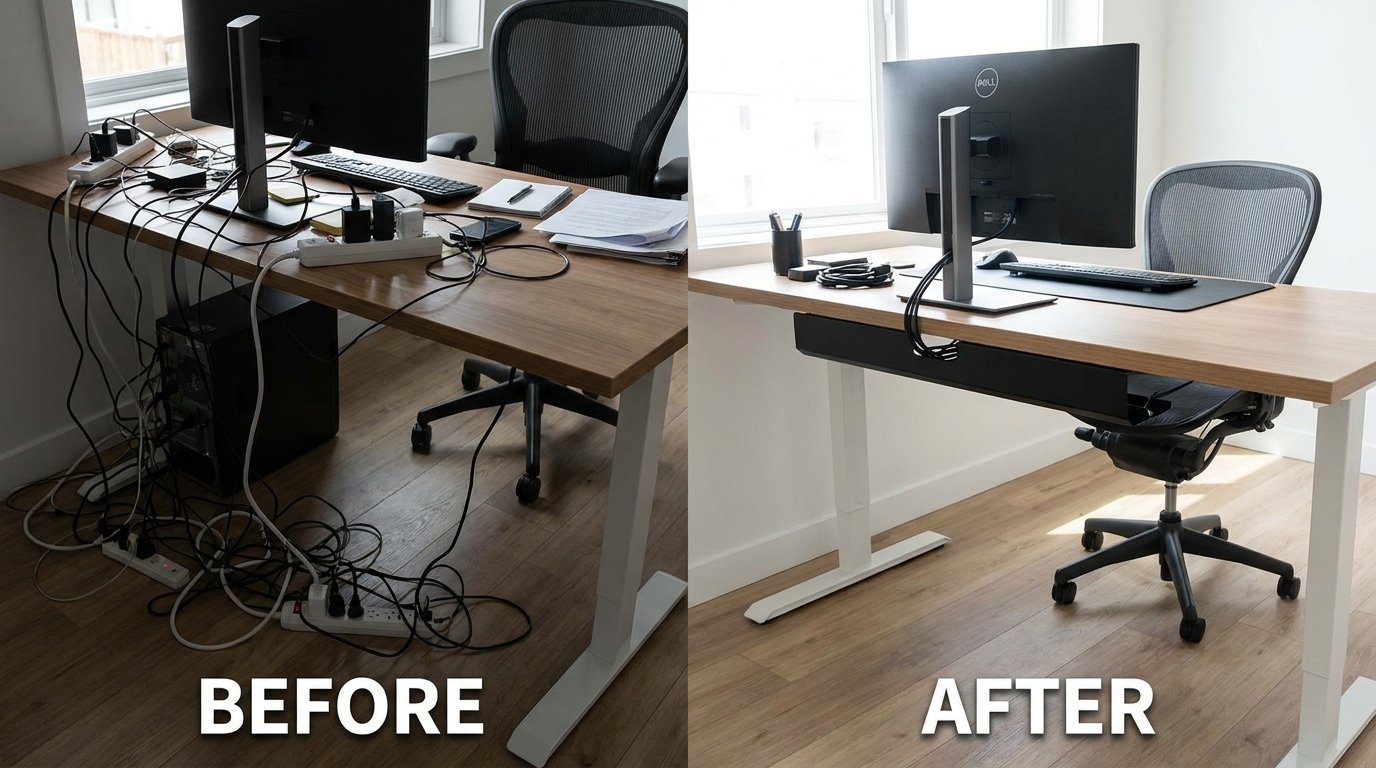

Cable Management: Why Messy Cables Make Your Home Look Cluttered
Messy cables can instantly make even the cleanest room feel disorganized.
Whether it’s a home office, entertainment center, gaming setup, or bedroom, tangled wires create visual clutter, collect dust, and make cleaning more difficult.
The good news is that cable management does not need to be expensive or complicated.
With a few smart tools and simple organization techniques, you can completely transform how a room looks and feels.
In this guide, you’ll learn:
- Why cable clutter happens
- The most common cable management mistakes
- How to hide TV wires without damaging walls
- Smart desk cable management ideas
- The best cable management products
- Easy solutions for renters and apartments
- How to maintain a clean setup long term
By the end of this article, you’ll know how to organize cables efficiently while making your home look cleaner and more modern.
Why Cable Clutter Happens

Modern homes use more electronics than ever before.
Most people have:
- TVs
- gaming consoles
- computers
- monitors
- routers
- speakers
- chargers
- smart home devices
- extension cords
Over time, cables begin stacking behind desks, under furniture, and near outlets.
Without proper management, wires become tangled and difficult to maintain.
Cable clutter can also:
- collect dust quickly
- create tripping hazards
- block airflow around electronics
- make cleaning difficult
- damage cables over time
The Most Common Cable Management Problems
Tangled Charging Cables
Phone and laptop chargers are often left loose on desks or nightstands.
Exposed TV Wires
TV cables hanging down walls create one of the most noticeable forms of visual clutter.
Messy Power Strips
Large power strips with multiple adapters quickly become chaotic.
Under-Desk Cable Clutter

Home office setups often hide massive cable messes underneath desks.
Router and Internet Cables
Wi-Fi routers and modem cables are difficult to hide neatly.
Best Cable Management Solutions for Desks

Desk setups are one of the most searched cable organization topics online.
A clean desk setup improves:
- focus
- productivity
- aesthetics
- cleaning access
- workspace comfort
Use Cable Clips

Cable clips help keep charging cords in place.
They prevent cables from falling behind desks and nightstands.
Magnetic cable clips are especially popular for modern setups.
Install an Under-Desk Cable Tray

Cable trays help hide:
- power strips
- extension cords
- charging bricks
- excess cable length
This instantly makes a desk setup look cleaner.
Bundle Cables Together
Velcro ties and reusable cable sleeves help organize multiple cords into one clean bundle.
This is especially useful for:
- gaming setups
- dual monitor desks
- home offices
Label Important Cables
Cable labels make troubleshooting easier later.
This helps avoid unplugging the wrong devices.
How to Hide TV Wires Without Damaging Walls

TV cable clutter is one of the biggest visual distractions in living rooms.
Fortunately, there are renter-friendly solutions that do not require major wall modifications.
Adhesive Cable Raceways
Adhesive raceways hide cables inside plastic channels attached to walls.
They are:
- affordable
- removable
- apartment-friendly
- easy to install
Many can also be painted to match the wall color.
Use Furniture Strategically
TV stands and cabinets can help hide:
- power strips
- HDMI cables
- routers
- gaming consoles
Strategic furniture placement reduces visible cable exposure.
Hide Cables Behind Decor
Plants, baskets, shelves, and decorative objects can help conceal wires naturally.
Wall-Mounted Cable Covers
Cable covers are ideal for mounted TVs where cables hang visibly below the screen.
Smart Cable Management for Small Apartments

Small apartments often have limited outlets and minimal space.
This makes cable management even more important.
Use Multi-Purpose Furniture
Furniture with built-in storage helps hide:
- charging stations
- extension cords
- routers
- power strips
Reduce Unused Electronics
Unused devices create unnecessary cable clutter.
Removing old electronics instantly improves organization.
Choose Wireless Devices When Possible
Wireless:
- keyboards
- speakers
- chargers
- headphones
can dramatically reduce visible cables.
Use Vertical Space
Wall-mounted shelves and cable organizers help free floor space.
Best Cable Management Products

The right tools make cable organization much easier.
Magnetic Cable Clips
Great for:
- desk charging cables
- bedside setups
- home office organization
They keep cables accessible without creating clutter.
Cable Sleeves
Cable sleeves bundle multiple wires together into one clean line.
Especially useful for gaming and computer setups.
Cable Management Boxes
Cable boxes hide:
- power strips
- adapters
- excess wires
These boxes improve safety and aesthetics.
Adhesive Cable Channels
Perfect for:
- mounted TVs
- apartment walls
- office spaces
Under-Desk Cable Trays
One of the best upgrades for home office cable management.
Common Cable Management Mistakes
Avoid these common mistakes when organizing cables.
Overloading Power Strips
Too many devices connected to one outlet can become dangerous.
Using Permanent Solutions in Rentals
Avoid drilling large holes if you live in an apartment.
Ignoring Heat and Airflow
Electronics need proper ventilation.
Bundling cables too tightly may trap heat.
Leaving Excess Cable Length Exposed
Extra cable loops create unnecessary visual clutter.
Forgetting Future Access
Always organize cables in a way that allows easy maintenance later.
How to Maintain a Clean Cable Setup
Cable management works best when maintained regularly.
Simple habits include:
- cleaning dust monthly
- checking loose cables
- replacing damaged cords
- removing unused devices
- reorganizing after adding new electronics
Small adjustments prevent clutter from returning.
Cable Management Ideas for Different Rooms
Living Room
Focus on:
- TV cables
- speakers
- gaming consoles
- streaming devices
Home Office
Prioritize:
- monitor cables
- chargers
- keyboard and mouse wires
- desk power management
Bedroom
Keep:
- phone chargers
- bedside cables
- lamps
- smart devices
organized and hidden.
Gaming Setup
Gaming desks often require advanced cable organization due to multiple devices.
Cable trays and sleeves are especially helpful here.
Final Thoughts
Cable management is one of the simplest ways to improve how a home looks and functions.
A clean setup not only improves aesthetics but also makes cleaning, maintenance, and device management much easier.
The best approach combines:
- smart organization
- proper cable routing
- hidden storage
- regular maintenance
- the right cable management tools
Even small changes can make a dramatic difference in how organized a space feels.
Quick Summary
- Use cable clips to control charging cords
- Hide TV wires with adhesive raceways
- Install under-desk cable trays
- Bundle wires using cable sleeves
- Use cable management boxes for power strips
- Improve airflow around electronics
- Avoid overloaded outlets
- Maintain organization regularly
With the right cable management system, any room can feel cleaner, safer, and more visually organized.